Aotearoa New Zealand · 2026‑27 tax year
your salary.
PAYE, ACC, KiwiSaver, student loan, a payslip hides a lot of arithmetic. Owed lays it out line by line at the official 2026‑27 rates, then helps you plan around what's actually left.
Where the average full-time week goes
Average weekly earnings for full-time employees: $1,730 before tax.
A year of pay · One clear picture
A year of pay is twelve or twenty-six versions of the same arithmetic. Owed does it once, at the official rates, and shows every line of it. The cards below use example figures.
kept across the year · example figures
The idea
We don't guess your taxes.
We show the working.
Most take-home calculators hand you one number and ask you to trust it. Owed lays out every step: which tax bracket each dollar landed in, what the ACC levy took, what your KiwiSaver rate set aside, what your student loan repaid, each at the official rate, with the source named.
Change your income type, salary, hourly wages, casual work, a second job, and the arithmetic changes with it, because each one is taxed differently.
Then the planner picks up where the payslip stops. Your take-home carries straight across: what life costs each pay, what's left over, and, if you're saving for something, what that leaves at the rate you're going.
Information, not advice. The numbers are yours; so are the decisions.
Why people trust it
We built it to be checked.
Official rates, cited
Tax brackets, ACC levy, KiwiSaver, student loan, every rate comes from the official source for the 2026‑27 year, and we name it.
Every line visible
No black box. Open any result and the full working is there, bracket by bracket, deduction by deduction.
Your figures stay yours
The calculation runs on this device. We store nothing unless you choose to save a budget to your account, and you can delete it any time.
Honest about limits
Where your situation needs a professional, provisional tax, self-employment, an unusual tax code, the result says so instead of pretending otherwise.
Questions
What people ask us first.
Is this financial advice?
Are the rates current?
What does it handle?
What happened to the Holidays Act checker?
See your real take-home in under a minute.
Free, no account, and nothing you type leaves this device.
How it works
You enter the figures.
We apply the official rates.
Most rates in the calculator come from Inland Revenue's payroll specification for 2026‑27, the document payroll developers build to, and the rest from the official IRD and MBIE pages named below.
Add what you earn
Salary, hourly wages, casual work, a second job, self-employed income, each one typed the way you're paid: per hour, week, fortnight, month or year.
We annualise it, the official way
Your income is annualised and run through the 2026‑27 tax brackets using the specification's own formulas, including the whole-dollar truncation payroll systems apply.
Every deduction, line by line
PAYE, the ACC earners' levy, KiwiSaver at your rate, student loan, the IETC credit where it applies, each with its rate shown, none of it a black box.
Then the budget takes over
Your take-home flows into the planner: what life costs per pay, what's left, and what your savings goal really takes at that surplus.
One honest caveat: we work out your position for the whole year, then divide it across your pay cycle. A real payslip is calculated the other way round, period by period, on the tax code your employer holds. The annual totals should line up; an individual payslip can differ by a few cents, and by more if your tax code isn't the one this assumes.
The rates we use
Official, current, and cited.
Sources: Inland Revenue, Payroll Calculations and Business Rules Specification 2026‑27, plus IRD's published KiwiSaver, IETC and student loan pages (ird.govt.nz); and MBIE's minimum wage rates effective 1 April 2026 (employment.govt.nz). If a figure here is ever wrong, tell us and we'll correct it publicly.
Privacy, by default
Yours to keep.
Ours to forget.
We store nothing unless you explicitly ask us to, and you can withdraw that at any moment.
The whole calculation runs in your browser, on this device. We can't see what you typed, and we don't want to.
Stored encrypted, only when you choose to save it, and reachable only through your own account. Deleted the moment you ask.
No account is required to calculate. An account is an email and a password. We never ask for your IRD number, employer, or bank details.
How to use OWED
Six steps, one pay cycle.
Everything OWED does, in the order you would do it. The calculator is free and needs no account. The rest is saved to your account, so it follows you between devices.
- 1
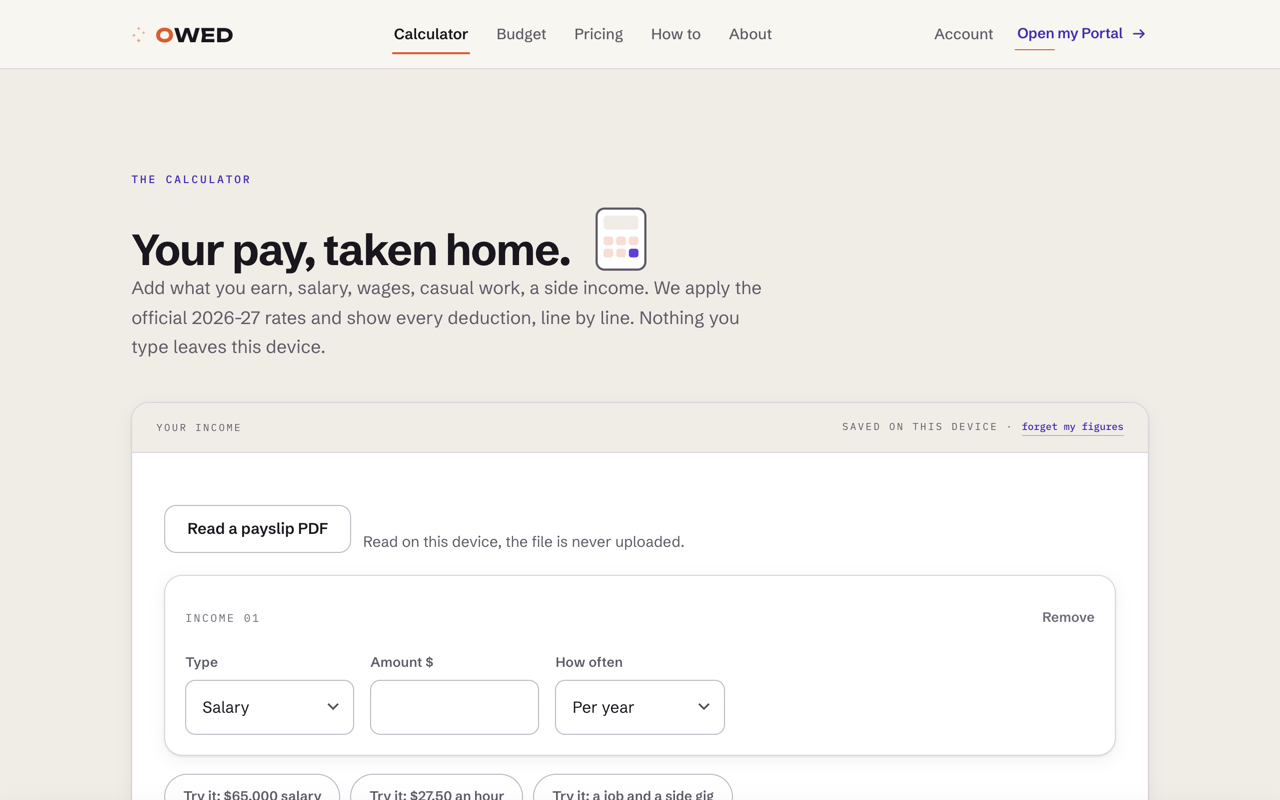
Calculate your take-home
Enter pay the way you receive it: salary, hourly, casual or a second job. PAYE, ACC, KiwiSaver and student loan are applied line by line at the official rates.
- 2
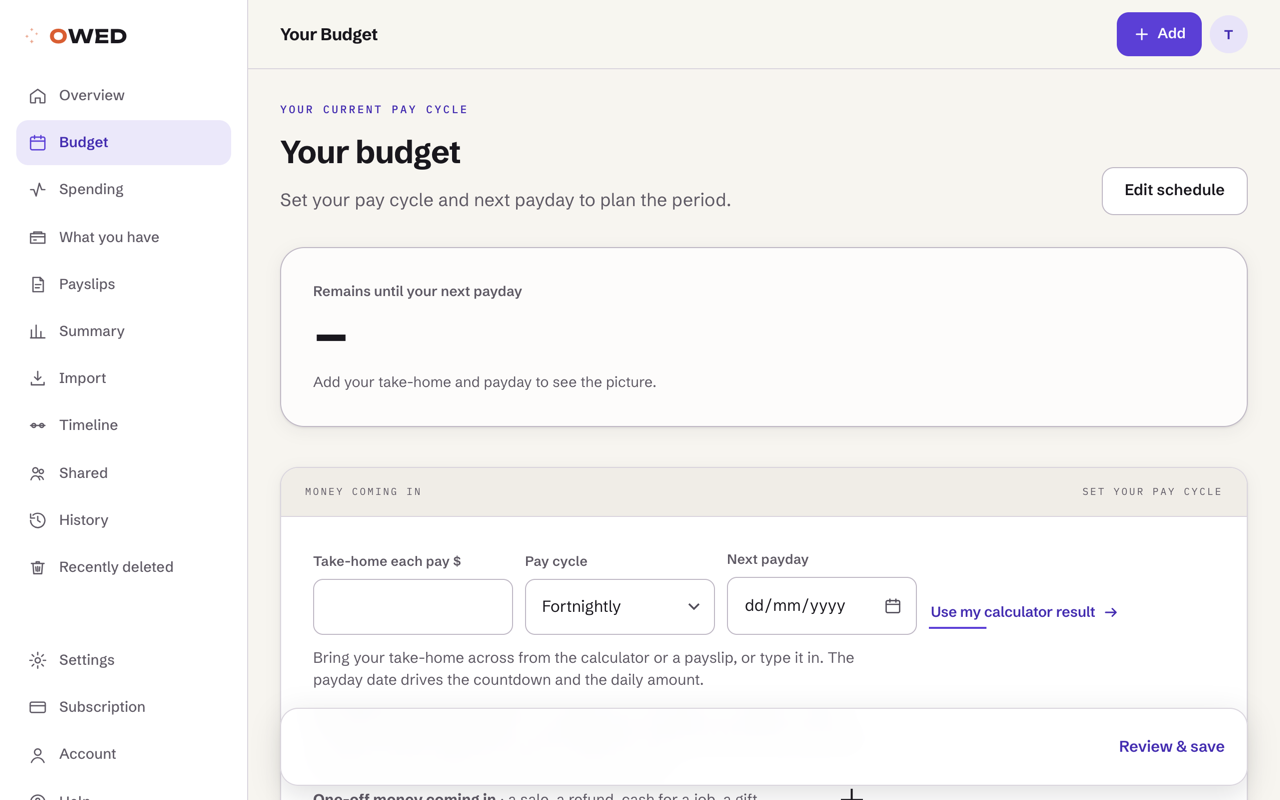
Save it as a budget
Carry the take-home into a budget, set your payday and pay cycle, and add the bills you already know about.
- 3
Check what is safe to spend
The Overview shows what is genuinely free until payday, day by day, with your bills, savings and one-off money already taken out.
- 4
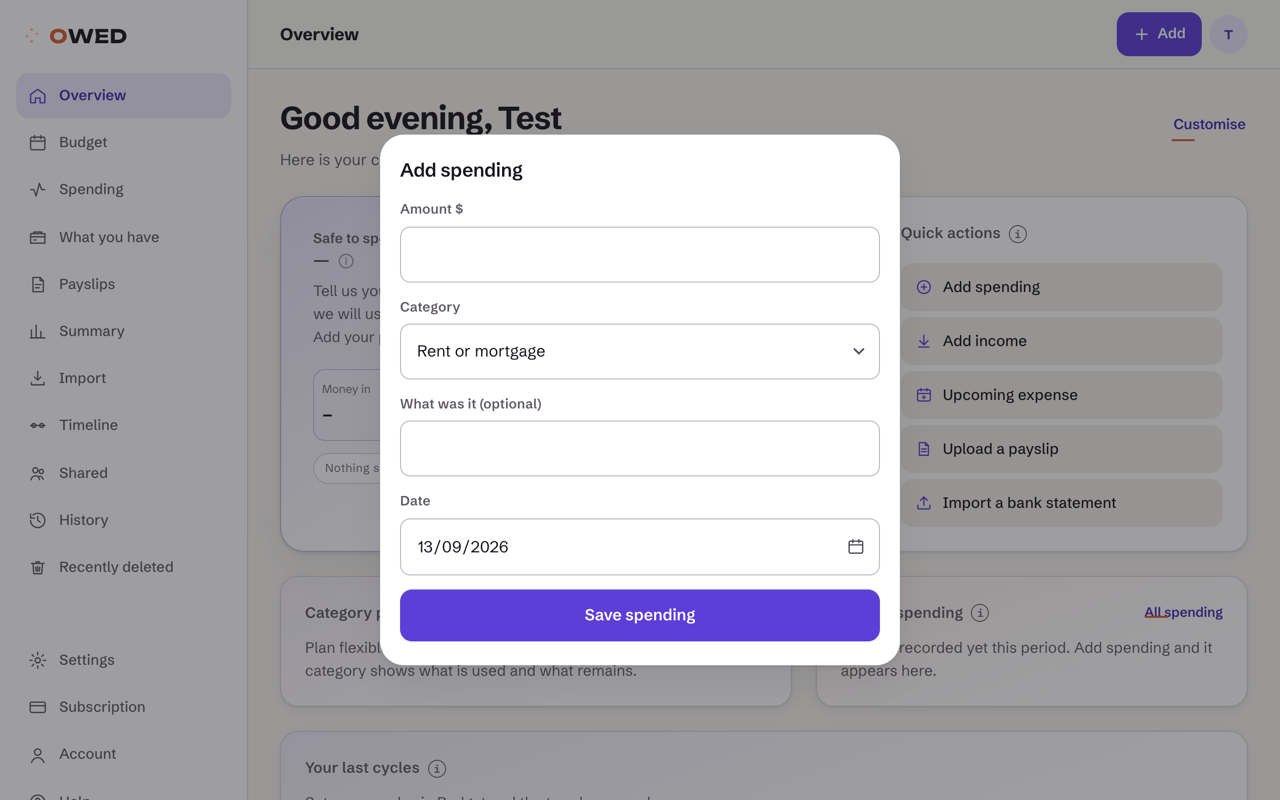
Add spending as it happens
Tap Add, type the amount and pick a category. It counts against this pay cycle and your safe-to-spend figure updates on the spot.
- 5
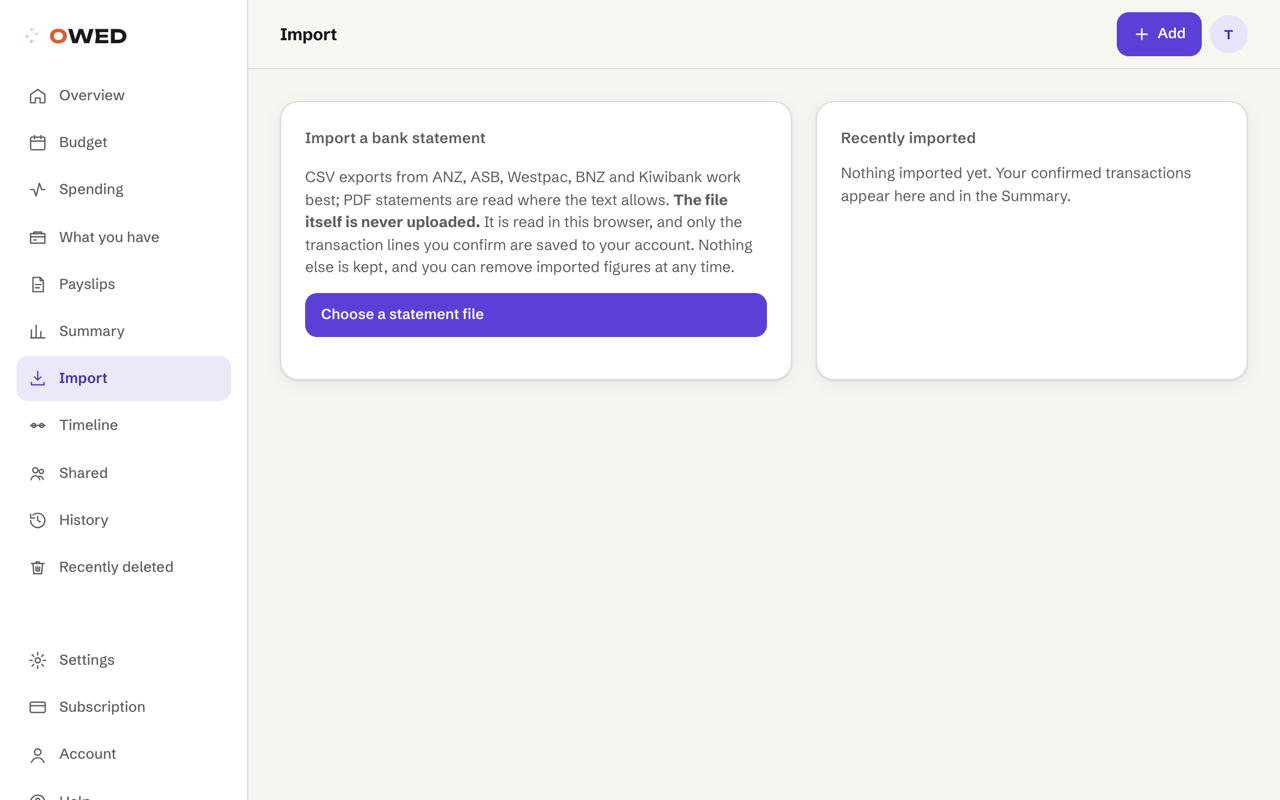
Import a bank statement
Choose a CSV or PDF statement from your bank. OWED reads it in your browser, suggests a category for each line, and saves only the lines you confirm. The file is never uploaded.
- 6
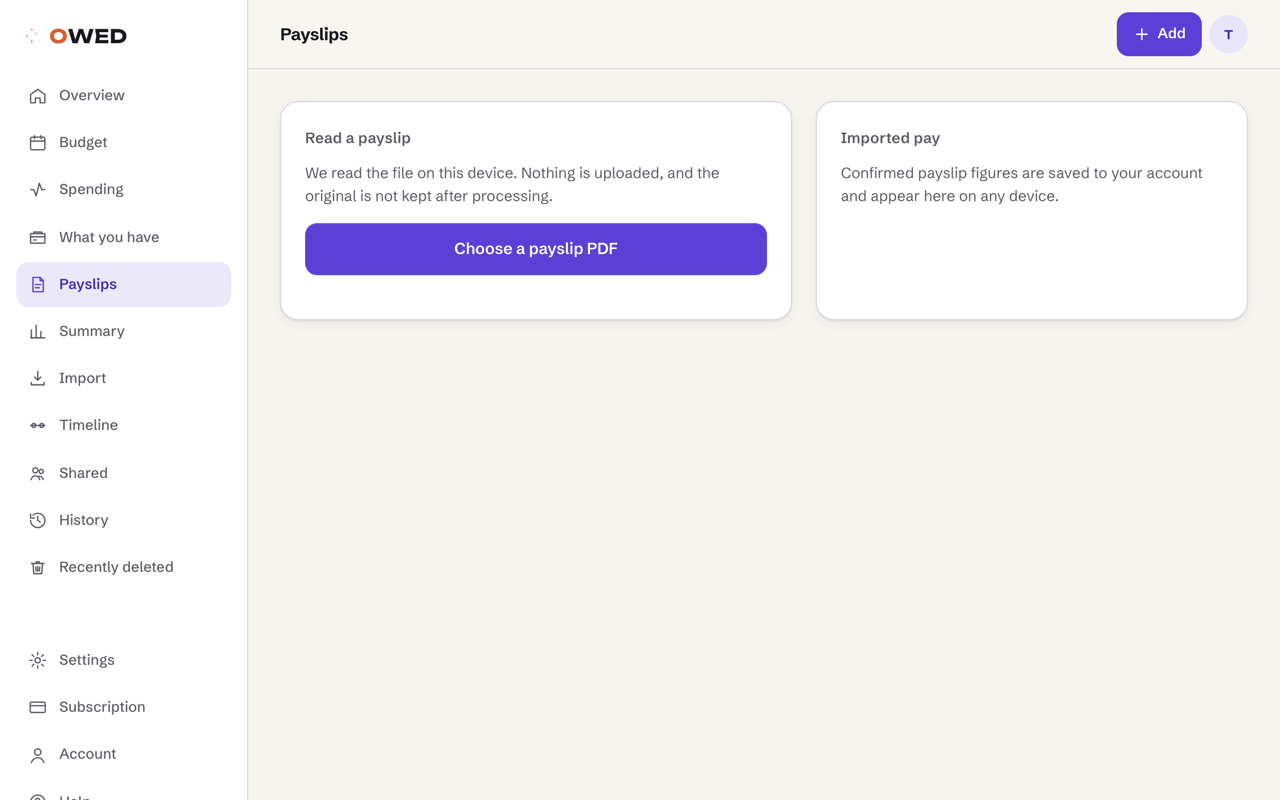
Read a payslip
Open a payslip PDF and OWED reads the pay lines on your device, then compares the net pay with the deposit in your imported statement, so short pay does not slip past.
About OWED
Money feels easier when
you can actually see it
OWED is a New Zealand budgeting app designed to turn everyday income and spending into a clear, useful picture.
Instead of giving you another complicated spreadsheet, OWED brings your pay, regular costs, flexible spending and savings into one place. You can see what is coming in, what is already planned and what remains.
What happens to your figures
The calculator never sends anything: it runs entirely on your device. When you choose to save a budget, this is the journey it takes.
In plain words: the connection is encrypted in transit, every saved row is tied to your account ID by database rules that run on the server, and the admin console has no view of budget contents. It can see that an account exists, not what is inside it.
Built for real routines
Not everyone is paid monthly, spends the same amount each week or wants to manage money in the same way. OWED adapts to your pay cycle, your priorities and the level of detail that works for you.
Information, not financial advice
OWED helps organise and explain the figures you provide. It does not tell you what financial decisions to make, and it does not replace personalised advice from a qualified professional.
Privacy should be understandable
We aim to collect only the information needed to provide the features you choose to use. Uploaded financial documents are processed for extraction and are not intended to become a permanent document archive.
Made here
OWED is being built in New Zealand for people who want a clearer relationship with their everyday money.
Start with the way you are actually paid
Weekly, fortnightly, monthly or irregular income can create very different routines. OWED plans around your pay cycle, so you can see what is due before the next payday and what remains during the period.
Your plan does not need to look like everyone else's
Choose a starting structure, adjust every amount and organise the app around your own goal. OWED provides planning tools and general information, not personalised financial advice.
See your whole pay cycle on one screen
What arrived, what is allocated and what is safe to spend, worked out per pay from figures you enter. Nothing is guessed for you.
Contact
Tell us what you're
trying to work out.
A person reads every message. We usually reply within one working day.
Email us
We answer everything, including the hard ones about our own maths.
Delete my data
Ask, and we wipe it. No forms, no retention period, no exit interview.
Tell us we're wrong
If a rate or a calculation looks off, send it. We check every one and publish what we fix.
Rather see it than ask?
The calculator needs no account. Two minutes and you have your take-home, every deduction shown, at the official rates.
Account
Your budgets, kept safe.
Your figures, kept yours.
We store everything below because you asked us to, we encrypt it, and you can wipe it in one click.
What Owed holds about you
Everything below is yours. Nothing here is sold, and nothing is shared with anyone outside Owed.
How it is protected
Consent
Clear my figures and set up again
Removes every budget, spending entry, imported transaction, payslip and category rule, then walks you through setting up again. You stay signed in.
We remove your budgets and your account permanently. We can't undo this, and we can't recover it for you.
Before you delete: if you are paying for Owed, cancel your plan first from above, and keep a copy of anything you need. Deleting your account ends your access straight away and does not, by itself, stop a payment set up outside Owed.
Console
The calculator
Your pay, taken home.
Add what you earn, salary, wages, casual work, a side income. We apply the official 2026‑27 rates and show every deduction, line by line. Nothing you type leaves this device.
Example figures, tap one to see how it reads, then type your own over the top.
IETC is the Independent Earner Tax Credit, up to $520 a year if you earn between $24,000 and $70,000 and don't receive a main benefit, NZ Super, a veteran's pension, or Working for Families. It starts reducing above $66,000.
Your current pay cycle
Your budget
Set your pay cycle and next payday to plan the period.
Bring your take-home across from the calculator or a payslip, or type it in. The payday date drives the countdown and the daily amount.
Pay different every time? Put in a typical pay and treat it as a guide, or leave the amount blank and import a bank statement. Owed will then work from what actually arrives instead of a figure you had to guess.
One-off money coming in · a sale, a refund, cash for a job, a gift
Counted in the cycle its date falls in, on top of your usual pay.
Owed saves as you type. Use this if you would rather save it yourself.
Regular commitments $0
Rent or mortgage, power, internet, insurance, subscriptions, repayments. The costs that arrive whether you think about them or not.
Flexible spending $0
Groceries, dining, fuel, the changeable part of the period. Planned amounts here become category limits you can track against.
Savings $0
Your amount, your call. If you set a target, we show how long it takes at this rate. We never suggest an amount.
Major upcoming expenses $0
Car service, annual insurance, a trip. Money that is already spoken for is shown separately from what you can still use.
Starting allocation Off
Plan flexible amounts and add spending, and each category shows what is used and what remains.
Set your payday and add commitments, and the period lays itself out here.
Pricing
Free to try.
Small when you stay.
Our calculator is free to use and will stay that way. You do not need to create an account or enter card details. A subscription adds saved budgets, daily spending and payday planning, with seven days free to see whether it fits.
Annual
One payment covers the whole year.
Equivalent to $8.25 a month. Paying monthly for a year costs $132, so the annual plan saves you NZ$33, 25% cheaper than paying monthly.
Monthly
Month to month, cancel whenever.
Billed monthly after your free trial.
What's included
Your trial starts when you choose a plan, and we tell you the date it ends. Cancel any time before then and you're not charged. After that, plans renew until you cancel; cancelling stops the next charge and you keep access to the end of the period you paid for. Prices are in New Zealand dollars and include GST.
Seven days free. Nothing is charged before day eight.
An OWED monthly plan costs less than many takeaway coffees. Pay monthly for NZ$11, or choose NZ$99 for a year.
Settings
Make Owed yours.
Appearance changes apply straight away and follow you to any device you sign in on.
Appearance
Light, dark, or follow your device. Your theme stays the same either way.
The tour
Two minutes on how Owed works: safe to spend, the budget, adding spending, imports, and what happens to your figures. It ran once when you joined; run it again any time.
Theme
Five looks. Each one keeps its own light and dark face.
Profile emoji
Pick a face for your dashboard greeting. Or use your initials.
Install Owed
Add it to your home screen and it opens like an app, full screen, one tap.
Add to home screen
Owed, one tap away.
Installing takes about ten seconds and doesn't use the App Store. Owed opens full screen, keeps your preferences, and still works when your connection drops.
Installing stores nothing extra about you. It's the same Owed, in its own window.
Your email is verified.
You're all set. You can now sign in to OWED.
Account
Sign in.
An account is optional. It exists so your saved budgets are there when you come back, behind your email and password, and nothing else.
We send one verification email. Your account activates when you confirm it. By creating an account you accept the and .
Reset your password
Type the email address you use for OWED. We send you a link. The link opens a page where you choose a new password.
Check your email
Open the link we have sent to your email. It takes you to a page where you choose a new password.
- It comes from OWED.
- The subject line is Reset your password.
- Emails can be slow to arrive. Look in your spam or junk folder too.
One thing to know. If that address does not have an OWED account, no email is sent. We do this so a stranger cannot use this page to find out who has an account. Your old password still works until you choose a new one.
If nothing arrives, look in your spam folder and check the address above is right. Our emails go out through a shared service that slows down when it is busy, so waiting is normal. You can send the email again with the button above. Still nothing? and a person will help.
That password link is no longer working
A password link works once, and only in the browser you open it in. Ask for a new one and we will send it straight away.
Check your email
Open the link we have sent to your email. That finishes setting up your account.
- It comes from OWED.
- The subject line is Confirm your email.
- Emails can be slow to arrive. Look in your spam or junk folder too.
One thing to know. If that address already has an OWED account, no new email is sent. We do this so a stranger cannot use this page to find out who has an account. If you have been here before, try one of these instead.
If nothing arrives, look in your spam folder and check the address above is right. Our emails go out through a shared service that slows down when it is busy, so waiting is normal. You can send the email again with the button above. Still nothing? and a person will help.
Check your email, or sign in
What happens next with that address depends on whether you have been here before.
- If this address is new to OWED, a link is on its way to it. Open that link to finish setting up your account. It comes from OWED and the subject line is Confirm your email. Emails can be slow, and they sometimes land in spam or junk.
- If you already have an account with this address, no email is sent. Sign in with your password, or reset it if you have forgotten it.
If you are sure the address is new and nothing ever arrives, and a person will help.
Confirming your email
One moment while we check the link.
Your email is confirmed
Your OWED account is ready. Sign in to continue setting it up.
This confirmation link has expired
Request a new email and we'll send you another link.
We could not verify this link
The link may have been used already, or it may be incomplete. If your email is already confirmed, just sign in.
Choose a new password
Your link worked. Type the password you want from now on. Use 8 letters or more. Type it twice so we know it is what you meant.
When you save it, you go straight to your dashboard. You do not need to sign in again.
That page isn't here.
The address may have changed, or it never existed. Everything real is one tap away.
That one's on us.
Something went wrong at our end. Your data is untouched. Try again in a moment, and if it keeps happening, tell us.
You don't have access to that.
That page belongs to another account. If you think that's wrong, sign in with the account that created it.
Legal
Privacy policy
Last updated 18 July 2026 · Prepared for legal review
Who we are
Owed (owed.co.nz) is built and operated by SmallPie (smallpie.co.nz), based in Auckland, Aotearoa New Zealand. For the purposes of the Privacy Act 2020 we are the agency that collects and holds the personal information described on this page. You can reach us any time through the , privacy questions are answered by a person, not a queue.
What we collect, and why
- Income and expense figures. The numbers you type into the calculator and planner are processed in your browser and never leave your device unless you choose to save a budget to your account.
- Account details. If you create an account: your name, email address, and password (stored only as a salted hash, we cannot read it). Optionally a coarse region such as "Auckland".
- Saved budgets. Stored encrypted at rest, only when you choose to save them, and with no view of their contents in our admin console. Staff with direct database access could read them; we do not, except to fix a fault you have reported.
- What you add to your budget. If you use the planning tools: spending entries, balances you type in, bills with their amounts and due dates, your pay cycle and payday, and the merchant rules you set. All of it is yours, all of it is behind the same protections, and none of it is visible in our admin console.
- Bank statements you import. The file is read on your device and discarded. Only the rows you confirm are saved: date, amount, description and the category we guessed or you chose. We never connect to your bank and never ask for a login.
- Payslips you read. The PDF is read on your device and discarded. What is kept is the figures it contained, gross, take-home, PAYE, KiwiSaver, student loan, the pay period and the employer name printed on it, so the product can check a deposit against it. Nothing is sent to your employer.
- Shared budgets. If you share a budget with somebody, the entries in that shared budget are visible to everybody in it, along with your display name. Nothing from your own budget is.
- Messages. Anything you send through the contact form, so we can reply.
- Technical data. Standard server logs (IP address, browser type, pages requested) held briefly by our hosting providers for security and abuse prevention. We run no advertising trackers and build no advertising profiles.
What we never collect
- Your IRD number. Owed has no field for it. We never ask, and we could not store it if you tried.
- Anything from your employer. If you read a payslip, the employer name printed on it is kept with the figures, and that is the only way Owed ever learns who you work for. We never contact your employer.
- Bank account or card numbers. We never ask for them, and there is nowhere on Owed to enter them.
How your information is used
We use personal information only to: keep your account working and show you the budgets you chose to save; answer your messages; keep the service secure and prevent abuse; and meet our legal obligations. We do not sell personal information, we do not run advertising, and we do not use your data to market other products to you.
Where your information is held, and who processes it
We use a small number of service providers ("sub-processors") to run Owed. Each receives only what its job requires:
- Supabase, database, authentication and file processing (data encrypted in transit and at rest)
- Netlify, serves the website and its edge functions
Your account and everything you save are held in Supabase's Mumbai region (AWS ap-south-1, India), and the website is served by Netlify from locations around the world. Under IPP 12 of the Privacy Act 2020 we only disclose personal information overseas where comparable safeguards apply, and each provider is bound by contractual data-protection terms. A current list of sub-processors is available on request.
How long we keep things
- Figures you type: not kept at all, they exist only in your browser until you close the tab.
- Saved budgets: until you delete them or close your account. Turning off saving stops new storage.
- Account details: until you close your account.
- Messages: until the conversation is finished and for a reasonable period after, so we can answer a follow-up.
- Anonymised statistics: indefinitely, they contain nothing that can identify you, your pay, or your employer.
Security, and who inside Owed can see what
All traffic is encrypted in transit (TLS). Everything you save is encrypted at rest. Access to personal information is restricted by row-level security in the database itself, the same rule that stops other users from reading your figures also binds our own client software. Payment state can only be written by the payment provider's signed webhook. A small number of authorised administrators can view account records (who has an account, its plan and status) in order to run the service, and the admin console has no view of budget contents. Every privileged administrative action (role changes, trial changes, resetting, disabling or removing an account) is recorded in an audit log that no admin console can edit. We may disable an account that breaches the terms of use; disabling cuts the account's data access immediately and is itself audited. No security is perfect; if we ever suffer a privacy breach that risks serious harm, we will notify the Office of the Privacy Commissioner and the people affected as the Privacy Act 2020 requires, and we will say so publicly on this site.
Your rights under the Privacy Act 2020
- Access: ask what we hold about you and we will show you.
- Correction: ask us to fix anything wrong and we will, or attach your statement of correction if we disagree.
- Deletion: the "Delete everything" button on your account page removes your account, saved figures and consents immediately, no waiting period, no exit interview. Two things remain. Payment references we must keep for tax law are retained but detached from any profile. And a one-way hash of your email address is kept so the free trial cannot be claimed again by re-registering; it cannot be turned back into your address and is linked to nothing else.
- Deleting single things: a spending entry, an imported row, a balance or a shared cost you delete waits in Recently deleted for 30 days, so an accidental swipe is never the end of it. You can restore it from there or leave it; after 30 days it is removed for good and no copy is kept.
- Complaint: if you think we've mishandled your information, tell us first and we will put it right. You can also complain to the Office of the Privacy Commissioner, privacy.org.nz, or 0800 803 909.
Children
Owed is a tool for working out pay and budgets and is not directed at children under 16. If you believe a child has created an account, contact us and we will remove it.
Changes to this policy
If we change this policy in any way that matters, we update the date at the top, and, for material changes, email account holders before the change takes effect. We will never quietly reduce your privacy.
Legal
Terms of use
Last updated 18 July 2026 · Prepared for legal review
1 · The agreement
These terms are an agreement between you and SmallPie (smallpie.co.nz), the Auckland-based operator of Owed (owed.co.nz). By using the site, with or without an account, you accept them. If you do not accept these terms, do not use Owed.
2 · What Owed is
Owed is an information tool. We take the income and expense figures you supply, apply the official published rates, income tax, the ACC earners' levy, KiwiSaver, student loan, and show you the working, plus a budget view built on the result. We are not a law firm, an accountant, or a financial adviser, and nothing we produce is legal, financial, tax, or professional advice.
3 · What Owed is not
We do not file anything, withhold anything, or determine your actual tax position, Inland Revenue does that. Your payslip and IRD assessment are authoritative; our calculations are estimates built from the figures you enter. We never contact your employer or IRD on your behalf.
4 · Eligibility and accounts
- You must be at least 16 years old and able to enter a binding agreement.
- Give us accurate details, keep your password secret, and tell us at once if you think your account has been compromised. What happens under your login is your responsibility until you do.
- One account per person. You may close your account at any time from the account page, and we delete your stored data when you ask.
- There is one kind of account: an individual one. An account is optional, it exists only so you can save a budget and come back to it.
5 · Your content and your promises to us
The figures you type stay yours. The calculation runs in your browser, so in ordinary use we never receive them at all. If you choose to save a budget to your account, you grant us a limited licence to store it so we can show it back to you, and nothing else, we do not read it, analyse it, or sell it. You do not upload documents to Owed, and we do not ask for anyone else's pay records.
6 · Acceptable use
You agree not to: use Owed for anything unlawful; probe, overload, scrape, or interfere with the service; attempt to access another person's saved budgets or bypass the database's access controls; resell or re-badge Owed as your own service; present a figure from Owed as an official tax assessment, or alter our output and pass it off as ours; or reverse-engineer the service except where law expressly permits. We may suspend or terminate access that breaches this section, and where behaviour is unlawful we may be required to preserve records for authorities.
7 · Intellectual property
The site, the rules engine, the report formats, the wordmark and everything else that makes up Owed belong to us or our licensors. Your report is yours to keep, print, and send to your employer or adviser for the purpose it was made for. Nothing here transfers ownership of our engine or software to you, or of your data to us.
8 · What Owed costs
The calculator is free, needs no account, and will stay that way. An optional subscription adds saved budgets, goals and history: NZ$11 a month or NZ$99 a year (both in New Zealand dollars, GST included), each starting with a seven-day free trial. We tell you the date your trial ends when it starts.
Card payments are not yet enabled. Until they are, starting a trial stores no payment details, and nothing can charge you, at the end of a trial your account simply returns to the free tier. When payments launch, they will be processed by a PCI-compliant provider, you will only ever be charged after adding a payment method yourself, plans will renew until you cancel, and cancelling will stop the next charge while keeping your access to the end of the period you paid for.
9 · Accuracy, corrections, and the limits of the tool
We work hard to get the calculations right, we record the engine version on every report, and where a figure is ambiguous we mark the finding "unclear" rather than guess. But results depend entirely on the figures supplied, documents can be misread, and interpretations of the Act can be revised. When we find an error we publish a notice on this site, email everyone whose saved results it touched, and put it right. Always verify a finding, against your own records or with a qualified adviser, before acting on it.
10 · Disclaimers and liability
- Owed is provided "as is" and "as available". To the maximum extent the law allows, we exclude all warranties, conditions, and guarantees not expressly stated in these terms.
- We are not liable for indirect or consequential loss, loss of income, loss of opportunity, or the outcome of any dispute, claim, or proceeding between you and your employer or any other party.
- To the maximum extent the law allows, our total liability to you for anything arising out of the service is limited to the greater of the amount you paid us in the twelve months before the event and NZ$100.
- Nothing in these terms limits rights you have under the Consumer Guarantees Act 1993 (where you use Owed as a consumer), the Fair Trading Act 1986, or any other law we cannot contract out of.
11 · Indemnity
You indemnify us against loss or claims arising from your breach of these terms, in particular entering figures or documents you had no authority to use, or presenting an altered report as ours. This indemnity does not apply to the extent we caused the loss.
12 · Changes, suspension, and ending
We may improve or change the service, and may change these terms; material changes are notified to account holders by email at least 14 days before they take effect, and continuing to use Owed after that is acceptance. If you don't accept a change, close your account, and if you had paid for something the change takes away, we refund the unused part. We may suspend or terminate accounts that breach these terms; sections that by their nature survive (your content warranties, IP, liability, indemnity, governing law) survive termination.
13 · General
These terms are governed by New Zealand law, and the New Zealand courts have exclusive jurisdiction. If part of these terms is held invalid, the rest stands. A failure to enforce a right is not a waiver of it. You may not transfer your rights under these terms without our consent; we may assign ours as part of a genuine restructure or sale of the service, with your protections intact. These terms, the privacy policy, the cookie policy and the disclaimer are the whole agreement.
Legal
Cookie policy
Last updated 18 July 2026 · Prepared for legal review
What we use, and why
We keep cookies and local storage to the minimum the product needs. We run no advertising cookies, we build no advertising profiles, and we never sell or share browsing data.
Essential cookies and storage
These keep the site working, so they load regardless of consent:
- Sign-in session, keeps you signed in to your account and refreshes your session securely.
- Test-phase gate, during the private test phase, a signed cookie remembers that you entered the gate password.
- Cookie choice, your answer to the banner, stored in local storage so we don't ask on every visit.
Analytics cookies
Off by default. If you accept them, we measure page views in aggregate to understand what helps people and what doesn't. Decline them and the site works exactly the same, with nothing withheld.
Marketing cookies
We set none. If that ever changes, this page changes first and we ask you again.
Third parties
Our fonts are served by Google Fonts and our animation library by Cloudflare's CDN; both receive the standard technical request data any web server receives. Neither is used by us to track you, and we set no third-party cookies of our own.
Your choices
The banner at the bottom of the page records your choice in your browser's local storage. Clear your browser data to be asked again, change your answer any time by clearing it, or email us and we'll help. Blocking essential cookies in your browser will break sign-in, everything else survives.
Legal
Disclaimer
Last updated 18 July 2026 · Prepared for legal review
Information, not advice
Owed provides information and automated calculations based on the figures you supply. Nothing on this site is legal, financial, tax, or professional advice. Your actual tax position is determined by Inland Revenue, not by this calculator.
Your inputs drive the results
Results depend entirely on the accuracy and completeness of what you enter. A missing income or a mistyped figure changes the answer. Where the calculation has to assume something, we say so on the result itself, but we cannot catch what we cannot see.
Automated calculations have limits
The calculator follows the published formulas for PAYE, the ACC earners' levy, KiwiSaver and student loan repayments, and records the engine version behind every result. It works on the annual figures you enter: a single payslip can differ by cents, and by more than that if your tax code is not the one the calculation assumes. Careful testing reduces error; it does not eliminate it.
No guaranteed outcomes
We guarantee no financial, legal, commercial or regulatory outcome. Your actual tax position is settled between you and Inland Revenue, on the figures they hold, not on anything shown here.
Decisions stay yours
You remain responsible for decisions and actions you take based on information from this platform, For anything consequential, provisional tax, a change of tax code, a large financial commitment, talk to an accountant, a tax agent, or Inland Revenue first.
No relationship is created
Using Owed does not make us your lawyer, your advocate, your union, or your agent. We owe you the duties stated in our terms of use, no fiduciary or advisory relationship arises, and nothing on this site creates one.
Third-party references
Where we name payroll systems, government services, or link elsewhere, that is identification, not endorsement, and no payroll provider endorses us. Their sites are governed by their own terms.
Your statutory rights
Nothing in this disclaimer limits rights you have under the Consumer Guarantees Act 1993, the Fair Trading Act 1986, or any other law that cannot be contracted out of.